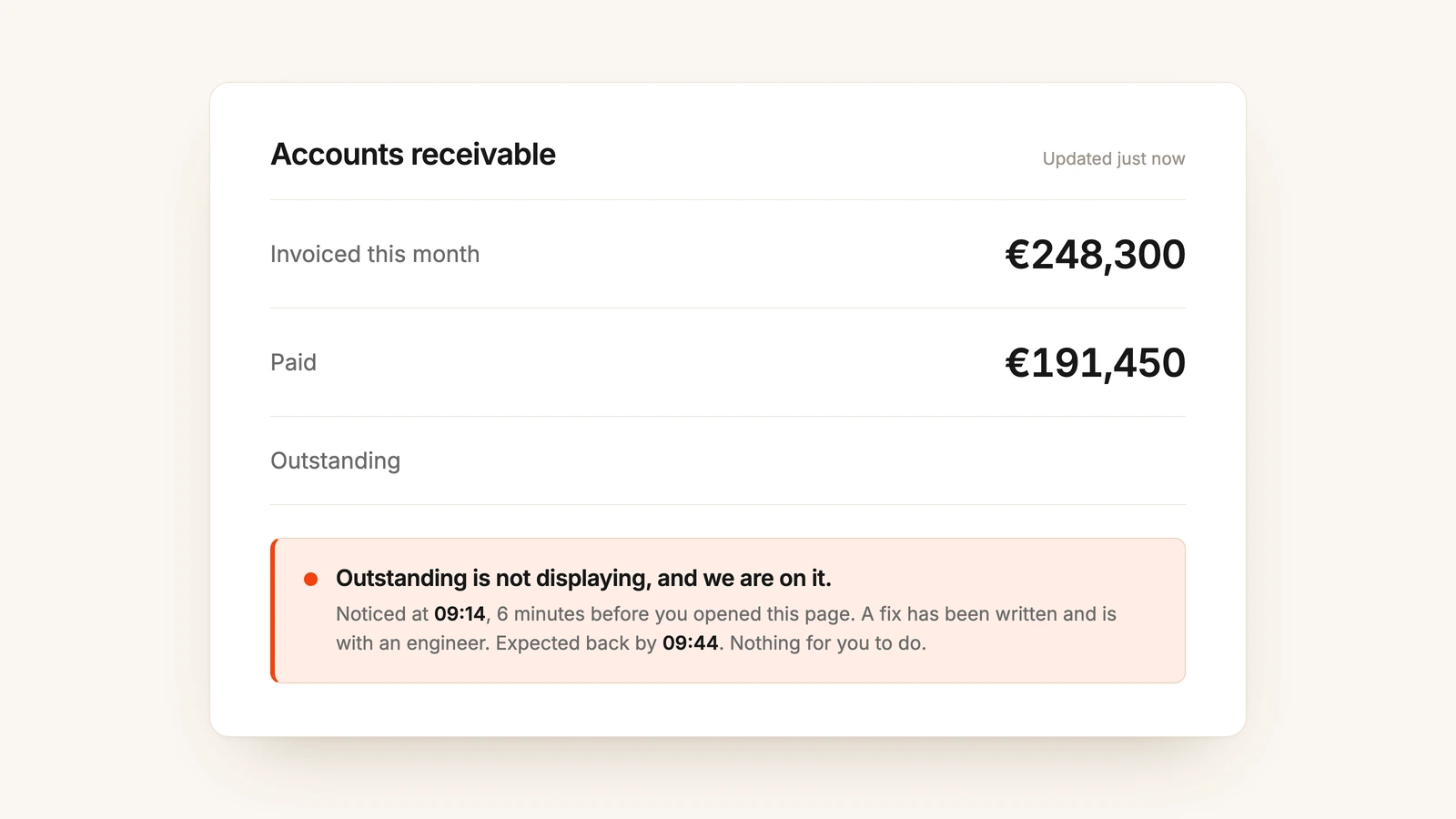
A customer writes to support: something in Light just failed. The support colleague passes it to LightDog, our AI investigator in Slack. Less than 2 minutes later, the answer is there. What failed. Why. Since when. How many other customers it touched. What to tell the customer.
No engineer opened a log. Nobody was pulled out of their work. Nobody had to be.
Finding out why something broke has always been an engineer's job, and it is rarely the fix that takes the time. It is everything before the fix: opening the monitoring tools, searching the logs, reading the code and explaining it all to whoever asked. At Light, that part no longer needs a human.
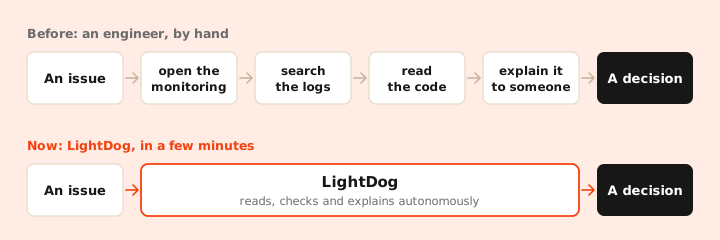
LightDog is the AI agent that does it. It lives in our Slack. Give it an alert, an error or a question, and it reads what an engineer would read: logs, metrics, traces, monitors and our source code. It works out what went wrong and writes the answer back in the thread, with the evidence. It only reads and explains. People keep 1 job: deciding what to do with the answer.
Every issue ends in 1 of 3 decisions
An investigation used to be the work. Now it is an input. Every diagnosis LightDog writes leads to 1 of 3 decisions, and none of them starts with a search.
Decision 1
Answer the customer
The cause is clear and easy to explain. Support replies with the reason and the way forward at the first contact, without a ticket to engineering.
Solved at the first touch
Decision 2
Close it
A false positive, expected behavior or a feature used in a way it was not built for. The evidence is in the thread, and nobody loses an afternoon to it.
Noise removed
Decision 3
Escalate with the cause
A real bug. The engineer gets the failing code path, the file and line, the evidence from the logs and a suggested fix. The work starts at the fix.
Straight to the change
From an engineering tool to a company tool
We built the first version for engineers on call, to help them triage alerts. The people using it changed faster than the code did, and the biggest change was in customer support.
Beyond engineering
Support colleagues now triage errors themselves. When a customer reports a problem, support asks LightDog and, in many cases, answers the customer without involving an engineer. When a fix is needed, the escalation arrives with the cause already attached.
It is the Great Flattening on a small scale: the person closest to the customer's problem now also understands its cause.
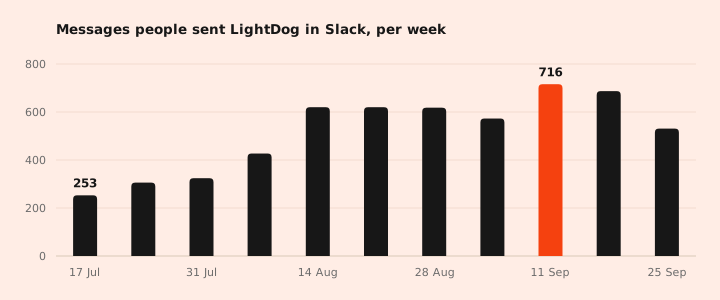
Since we started counting in mid-July, LightDog has written more than 7,000 answers.
A reference that stays current
People also started asking it how features work. LightDog answers from the code rather than from documentation, so its answers do not go out of date. For questions about how Light behaves today, it has become the most current reference we have.
Written for whoever is asking
Not everyone needs the same answer. A support colleague wants to know what to tell the customer. An engineer wants the line of code. So LightDog shapes each answer for the person asking, and anyone can ask for the other version, for example to escalate with the full detail.
For non-technical colleagues
Plain language
The big picture in plain words: what went wrong, who it touched, how often and who should step in. No jargon, nothing to decode.
Read it once, know what to do
For engineers
The technical detail
The root cause, a fix to start from and links to the exact code and queries behind every claim.
Ready to act on
Ask it anywhere… or don't
A tool like this is only useful if people reach for it, so LightDog lives where the questions already are. There are 4 ways to reach it:
- Mention it in any Slack thread. It reads the whole thread, so follow-up questions keep their context.
- Send it a direct message, the way you would message a colleague.
- Do nothing. In our alert channels, it picks up each new alert on its own.
- Call it over MCP from a coding agent, the way our engineers do. MCP (Model Context Protocol) is the standard way for AI tools to talk to other systems, and our own coding agent calls LightDog the same way. We expect this to become the most used of the 4 as agents take on more of our work.
1,237 alerts investigated since July without anyone asking.
How it finds the cause
LightDog reaches our monitoring and deployment tools through MCP and reads our code from its own copy, always with read-only access.
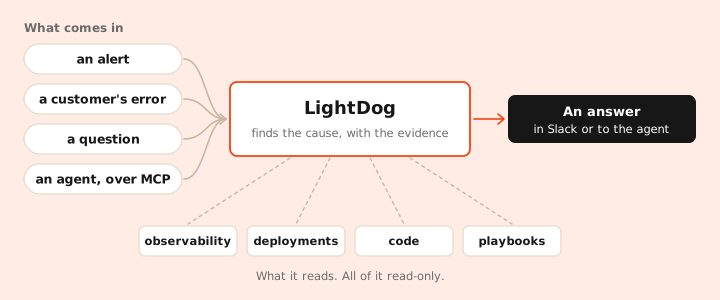
With all of that in reach, it follows a problem through every part of the app. A request can start in the web app or the mobile app, pass through the backend and end in a queue or the database. LightDog follows it across each of them, from the page where the customer saw the error to the line of backend code that caused it.
It reads the monitors too, so when the alert itself is the problem, such as a threshold that is too tight, LightDog says so.
Teaching it new investigations
Some problems come back again and again, and an experienced engineer knows exactly where to look for each one.
We write that knowledge down as playbooks: short written guides that say when they apply, which steps to take and which traps to avoid. When an issue matches one, LightDog follows it.
A new kind of investigation needs only a new playbook, written in plain words and kept alongside LightDog's code. What 1 engineer learned once, LightDog applies every time.
Fast enough for a chat
Most questions come from a person waiting in Slack, so speed matters as much as accuracy. 3 choices keep it fast:
- Done when it's sure. With someone waiting, LightDog stops the moment it has confirmed the cause, not after checking everything it could. Alerts have no one waiting, so they get the deep dive.
- Smartest isn't always best. Maximum thinking sounds safest, but in a chat every extra second shows. We turned it down: answers came 40 to 48% faster on our hardest test cases, and LightDog still found every cause.
- Going direct where it can. LightDog could read our code through GitHub's MCP server, but each MCP call takes about a second. It keeps its own copy of the code instead and reads it around 20 times faster.
What is left for people
What began as an alert helper for engineers has become a shared way for anyone at Light to find out why something broke, without waiting for the person who knows where to look.
The decision is still ours. People still answer the customer, close the issue and change the code. LightDog makes sure they start with the cause, not with a search.
Our software now fixes some of its own problems. For everything else, the investigation is already done.
LightDog helps us keep Light, the agentic ERP, reliable for our customers. See the product or book a demo.