
Here's what's new in Light over the last two weeks.
You can now watch these Flash updates inside Light, too. Just open notifications in the bottom left of the desktop app.
What we shipped
LCI updates
We're constantly improving the Light Command Interface, the LCI, which you probably know best as our chat assistant.
You can now post draft journal entries from the chat, including retrying ones that failed.
The assistant can also answer accounting questions using our help centre and IFRS standards, or find invoices missing a revenue release schedule and apply the right template in bulk. It'll report anything it skips.
We've also added confirmation steps. Before posting or deleting an entry, archiving an invoice or sending a message, it shows you what it's about to do and waits for your approval. That applies in Slack and Teams, too.
Autonomous, but not unsupervised. That distinction matters more the more the assistant is trusted with.

Auto top-up
Cards running dry mid-month is a solved problem now.
Ask the assistant to create a top-up agent and it'll watch your wallet balance. Set your threshold, and when the balance drops below it, the agent tops it up.
You decide how much rope it gets: alert you, or ask for confirmation in Slack or Teams.
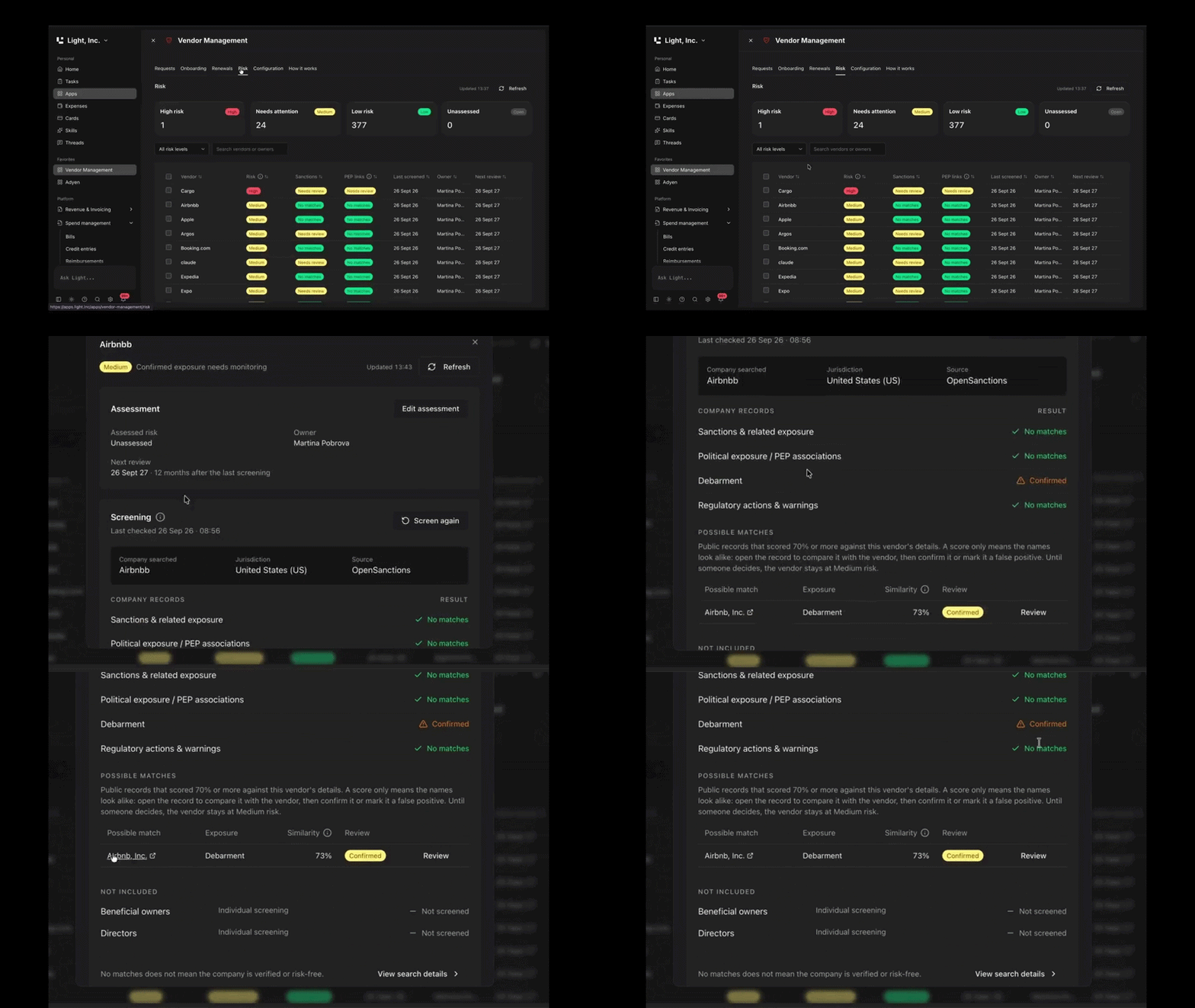
Vendor screening
Every company pays vendors. Almost nobody checks all of them.
Light now checks vendor VAT numbers against official registries and confirms that the legal name matches the company you're doing business with. It also screens companies and their beneficial owners against global sanctions and PEP lists.
Those checks run at onboarding, whenever details change and on renewal. Sanctions lists move and ownership changes, so a check that only happens once stops being a check.
Add your cards to Light
Moving finance platforms is hard enough without being told to reissue every company card first.
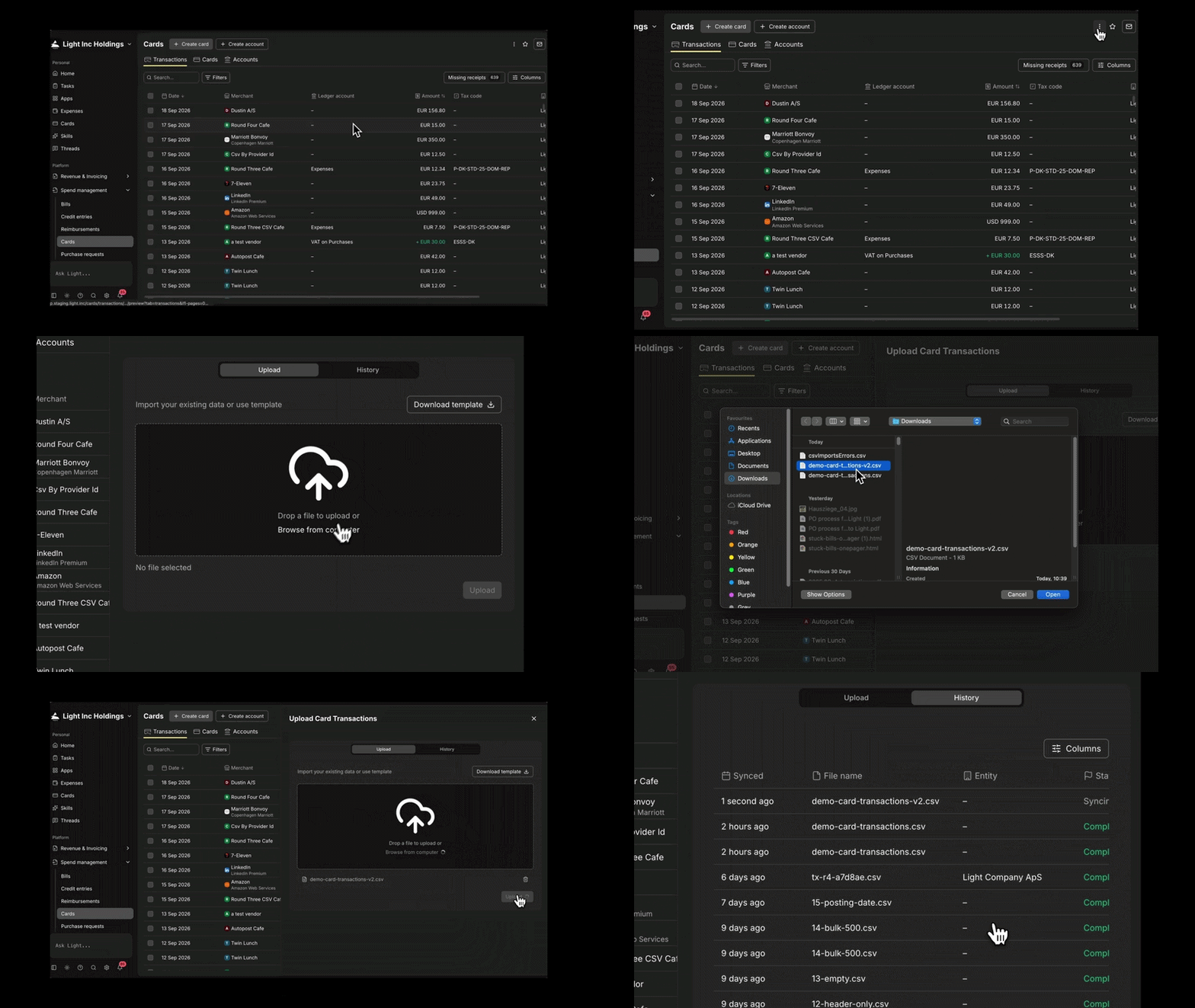
We've started rolling out support for cards from other providers, including Amex and your bank. So you can bring your existing company cards into Light without replacing them.
Create an external card account, add your cards in the app or by CSV, then import transactions by CSV or through the API.
From there, Light requests receipts, matches and codes the transactions, and posts them to the ledger. They behave the same way cards issued through Light do.
If you're interested, reach out to your Light account or implementation manager.
Plus, all this
- Sort line items on invoices, credits and contracts. Click any column header to sort by product, quantity, price and more. Your sort order is remembered and doesn't change the saved order or the PDF.
- Declined and voided card transactions now visible. Filter by status, see the reason, and bulk edit correctly leaves these rows alone.
- Email alerts for payment failures. Available alongside Slack, Teams, mobile and web push in your notification settings.
- Map your Stripe tax rates to Light tax codes. Set the mapping in integration settings and both invoice imports and AP use it rather than inferring from Stripe's own signals.
- Faster bills list for high volumes. Noticeably quicker for companies carrying a lot of bills.
- Advanced activity logs. Every high-level action now writes to a single log, across AP, AR, payments, cards, agents and workflows. So you can see everything one person did, every update in a period, or everything a single agent run touched from start to finish.
- NemHandel e-invoicing for Denmark, KID payment references for Norway. Danish entities can register for NemHandel during entity setup and send OIOUBL invoices and credit notes. Norwegian entities can configure KID payment references in entity settings, and Light calculates the check digits and includes them on sales invoices.
That's Flash #13. If you have questions, reach out to your Customer Success contact or use the LCI assistant.